-
VodaHost
Your Website People!
1-302-283-3777 North America / International
02036089024 / United Kingdom
291916438 / Australia
------------------------
Top 3 Best Sellers
Web Hosting - Unlimited disk space & bandwidth.
Reseller Hosting - Start your own web hosting business.
Search Engine & Directory Submission - 300 directories + (Google,Yahoo,Bing)


-
Re: Linking your pages together (creating Hyperlinks with text, images etc...)
If you want to link together two page that where created in BlueVoda please follow the below instructions to the letter.
1) Watch the above video to learning the basics about hyperlinking.
2) Highlight the text or object that you want to hyperlink.
3) Press the hyperlink button in the tool bar and you will see the below box.
Lets say you created a page called info and you want to link to that page, when you save that page you will notice that BlueVoda saves all the pages with a .bvp extension at the end of every page name.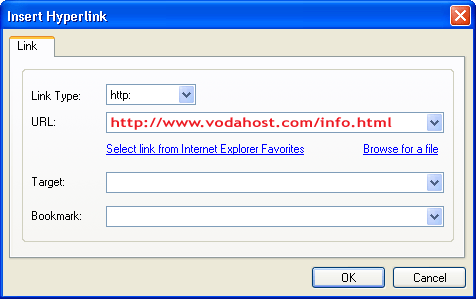
4) In the URL Box in Red Above, type in the full url of the page you want to link to.
5) change the .bvp to .html and use a slash ( / ) to separate your domain name and the page name. Repeat the same process for all the pages you want to hyperlink
VodaHost
Your Website People!
1-302-283-3777 North America / International
02036089024 / United Kingdom
291916438 / Australia
------------------------
Top 3 Best Sellers
Web Hosting - Unlimited disk space & bandwidth.
Reseller Hosting - Start your own web hosting business.
Search Engine & Directory Submission - 300 directories + (Google,Yahoo,Bing)
- Welcome to VodaHost!
The official web hosting company for the BlueVoda Website Builder. You are currently viewing our support forum as a guest which gives you limited (read only) access. By joining our support forum you will be able to ask questions, participate in discussions and receive assistance. Registration is fast and simple. Click Here To Join our support forum today! We look forward to helping you build and publish a fantastic website.

 Linking your pages together (creating Hyperlinks with text, images etc...)
Comment